Organization Verification
Written By Vik
Last updated 3 months ago
In digital credentialing, who issues a credential is just as important as what it represents. Recipients and verifiers need to know that credentials come from a trusted and authentic source.
Wauld’s Organization Verification process helps establish your organization’s authenticity, strengthen the credibility of your credentials, and give recipients and third parties greater confidence in the credentials you issue.
Organization verification is completed in two stages:
Your organization verifies control of its website domain using a DNS record.
Wauld’s support team reviews your organization information before approving the Verified badge.
Why Organization Verification Matters
When recipients share a credential, they are not only showcasing their achievements. They are also representing the organization that issued the credential.
A verification badge helps employers, recruiters, educational institutions, government agencies, and other third parties recognize that the credential was issued by a verified organization.
Organizations that have not completed the verification process will not display the Verified badge on their credentials.
What You Gain by Verifying Your Organization
Here’s what you gain by verifying your organization on Wauld:
Where the Verified Badge Appears
Once your organization is verified, the badge is displayed:
On every newly issued credential
On verification pages
Within recipient dashboards
Please note that only credentials issued after your organization has been verified will display the Verified badge. Credentials issued before verification will not be updated retroactively.
Who Can Start Organization Verification?
Only Co-Owners of a Wauld account can initiate organization verification.
Follow these steps to begin the verification process:
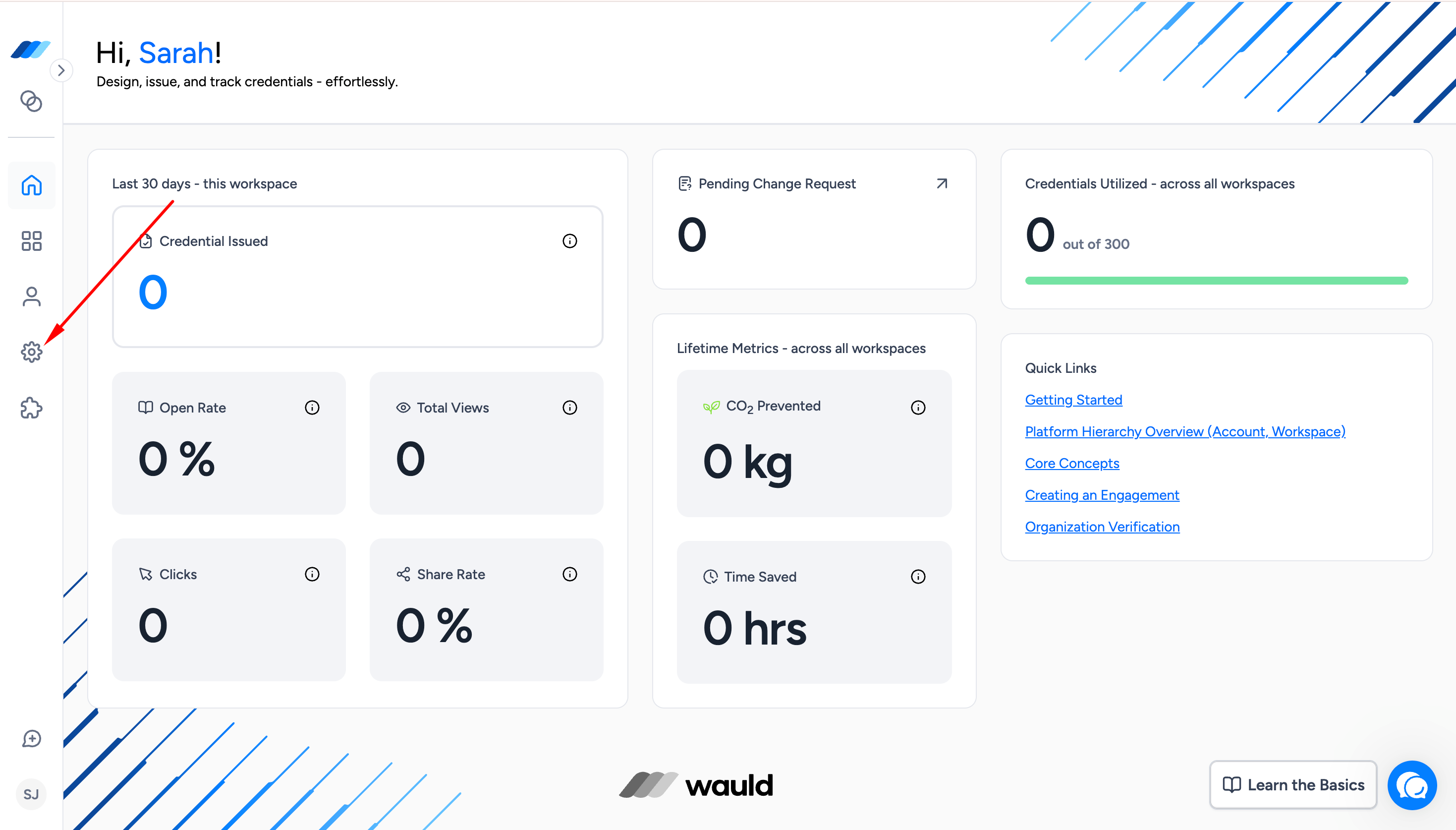
Go to Admin Centre → Account. The Account tab opens by default.
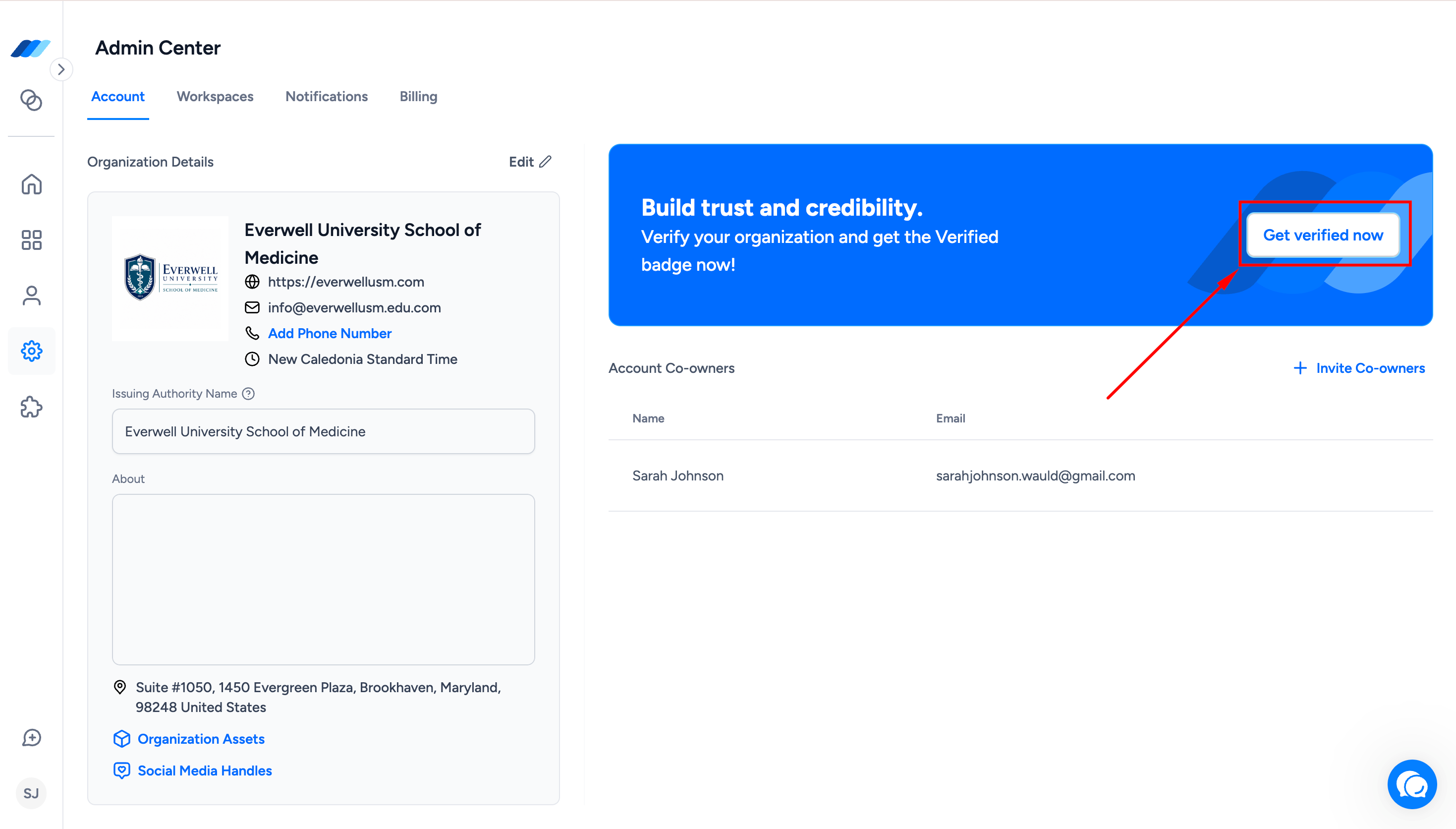
Click the Get Verified banner in the top-right corner.
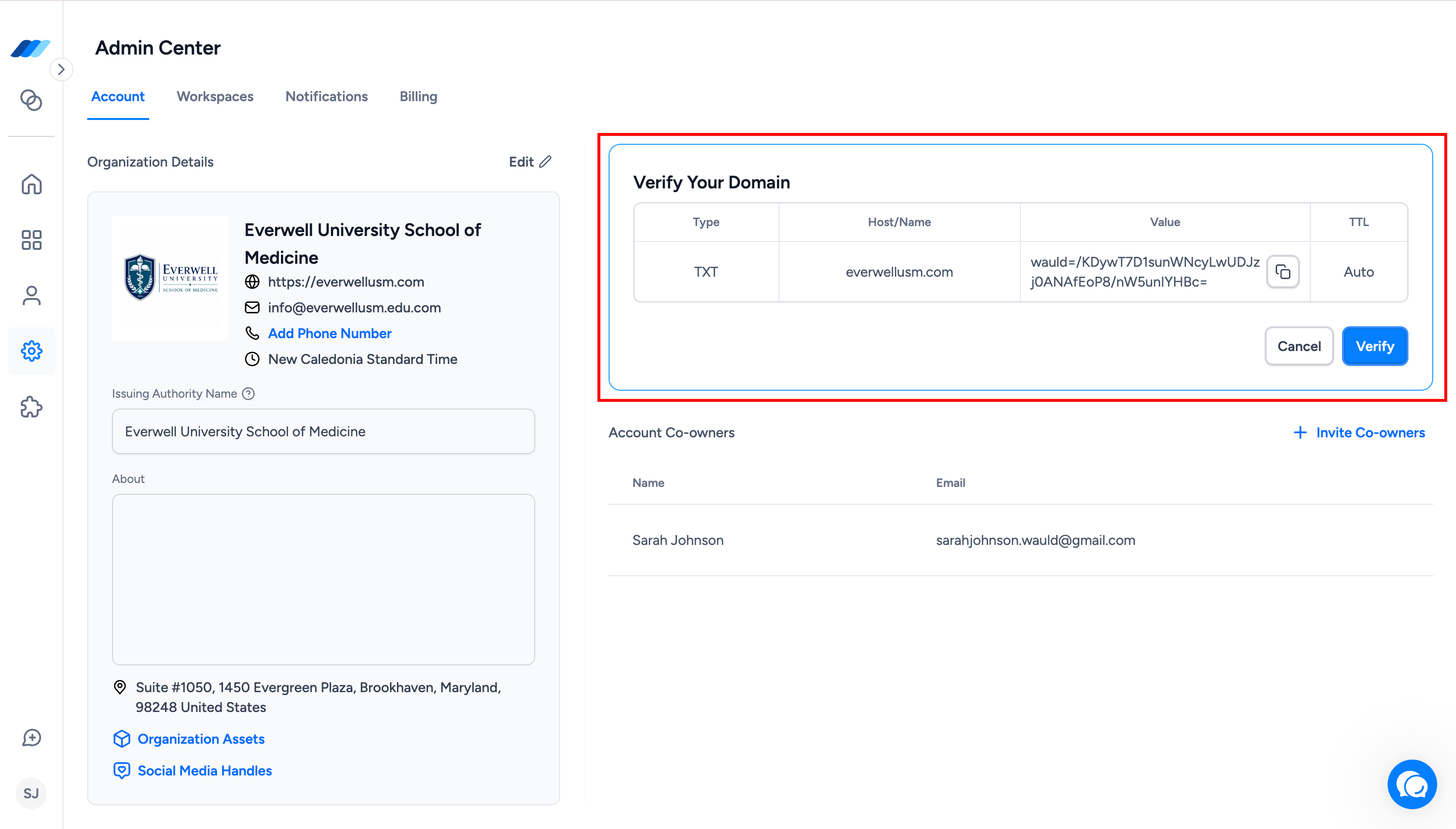
Wauld will display the DNS record details required for verification:
Type
Hostname
TXT value
TTL
Sign in to your domain registrar or DNS provider.
Open the DNS management settings for your organization’s domain.
Add a new DNS record using the exact values displayed in the Wauld Admin Centre.
Save the DNS record.
Return to the Wauld Admin Centre.
Click Verify.
If the DNS record has been added correctly and is publicly available, your domain will be verified automatically.
Your organization’s verification status will then change to Under Review while Wauld’s support team completes the organization review.
What Happens After DNS Verification?
After your domain is verified, Wauld’s support team reviews your organization information, including:
Your organization or issuing authority name
Your organization logo
Your verified website domain
Other publicly available information associated with your organization
In most cases, no additional documentation is required.
If the support team can confirm the required organization information through its review, the verification will be approved without contacting you.
If additional information is needed, the support team may contact you through your registered email address and request supporting documentation.
The support review is normally completed within 1-2 business days from the date your DNS verification is completed.
Once the review is approved, your organization’s status will change to Verified, and the Verified badge will be granted.
Documents We May Request
Supporting documents are not required for every verification request.
Wauld’s support team may request documents when additional information is needed to confirm:
Your organization’s legal existence
The requester’s employment, association, or authorization to represent the organization
All documents must be clear, valid, and issued by an authorized institution.
Accepted Proof of Organization
You may provide any one of the following:
Any document, notice, or letter issued or stamped by the IRS that includes your organization’s name
Examples include CP575, 147C, CP299, 988, 937, 1050, and 5822.
An IRS form, provided that a copy of the form is available on the IRS website
Examples include Forms 8871 and 990.
A Certificate of Business Incorporation issued by the state in which your organization conducts business and clearly displaying your organization’s name
Your most recent SEC filing, such as Form 10-K, 10-Q, or 8-K, displaying your organization’s name
A business credit report from Experian, Equifax, or TransUnion that lists your organization’s name
For government departments and agencies, an official letter on department letterhead that includes the department’s full name, address, and date
Proof of Authorized Representation
To verify that the requester is authorized to represent the organization, Wauld may request:
A government-issued photo ID
Examples include a passport, driver’s licence, state ID, or Green Card.
Proof of employment or affiliation
Examples include a company-issued ID card, official company email correspondence, or employment letter.
If documentation is required, the support team will provide instructions for submitting it securely. All communication regarding the requested documents, review progress, additional information, and final approval will continue through the same email thread. Remember to check your spam or junk folder if you are expecting an email from the Wauld support team.
Track Your Verification Status
Your organization verification status is displayed in the Admin Centre.
There are three possible statuses:
Not Verified
Your organization will display the Not Verified status when:
Organization verification has not been started
DNS verification has not been completed
A verification request was not approved
A previous verification was revoked
Your organization’s website or domain was changed
You can start the verification process or apply again from the Admin Centre.
Under Review
Your organization will display the Under Review status when:
Your website domain has been successfully verified through DNS
Wauld’s support team is completing its organization review
Your organization logo has been changed
Your organization or issuing authority name has been changed
During this stage, the support team reviews your organization information and may contact you if additional documentation is required.
The review is normally completed within one to two business days.
Verified
Your organization will display the Verified status when:
Domain ownership has been confirmed through DNS verification
Wauld’s support team has completed its organization review
Any requested information or documentation has been reviewed and approved
Once verified, your organization receives the Verified badge. The badge will appear on credentials issued after verification and in the supported credential and verification views.
What the Verified Badge Looks Like
Once your organization is verified:
Newly issued credentials will display a blue Verified badge with your organization’s name.
Recipients and credential viewers will see the badge in:
Credential detail views
Verification pages
Recipient dashboards
Credentials issued before your organization was verified will not be updated retroactively.
What Happens If You Change Organization Information?
Changes to your organization information may affect your verification status.
If You Change Your Website or Domain
Your verification will be revoked, and your organization will return to the Not Verified status.
You will need to complete the organization verification process again using the new domain.
If You Change Your Logo or Issuing Authority Name
Your organization will move to the Under Review status.
Wauld’s support team will review the updated information and may contact you if additional documentation is required.
The review is usually completed within one to two business days. Once approved, your organization will return to the Verified status.
Your Information Is Safe
Documents and information submitted for organization verification are handled confidentially and used only for verification and compliance purposes.
When documentation is required, the Wauld support team will provide secure submission instructions.
Ready to Get Verified?
Go to Admin Centre → Account, click Get Verified, and follow the displayed DNS verification instructions to begin verifying your organization.